I have been reluctant to trying out cloud agents for a long time and got so used to my way of working using local agents. Now I use both but starting to push more work to the cloud. I spend most of my time in Devin Desktop and devin.ai which is gives me cloud agents on the same subscription.
I started with cloud agents out of curiosity and to offload work that I don\t like doing: Testing.
Not unit tests. The end to end stuff I always do after a feature or a bigger release. Making sure the app actually does its job for a real user. That used to mean clicking through everything ... and spending a lot of time on it, plus writing down whatever broke.
Then I handed that to Devin.
Finally I can hand over testing to someone who will be more thorough than me. Devin is doing all the testing for me from now on, I quit testing. I will just ask devin to go through my code end to end and prepare a test plan, and ask him to run it in the cloud.…
Worth mentioning that I have been using Windsurf in the past and now Devin Desktop so I am quite familiar with the product and the ecosystem. I am also a Cognition Ambassador.
Because of that people ask me what Devin actually is and often times I reply in comments with all the features and how to use them.
I see that there is lack of end to end understanding about Devin, what it actually is, what you get as part of the subscription, what's Devin Desktop etc.
So decided to put this all together to help both beginners and advanced users in understanding what Devin actually is and what you get after signing up.
This is the long version. Cloud, Desktop, CLI, deepwiki, automations, review, testing, security.
This is a collection of my own experiences what I have used myself (will be highlighted by me in the text) as well as a collection of details I've gathered from the docs or from research of credible sources.
I have been using Codex, Claude Code in the past, I use Hermes and Pi as well but Devin Desktop and Devin.ai platform is where all my coding is done.
What Devin actually is
Think of Devin as an "the AI software engineer." An autonomous agent that can write, run, and test code and keep iterating on real engineering work.[1]
Devin works more like an engineer with a computer. It gets a cloud session with a virtual machine, a shell, a browser, and repo access, and it can keep going after I close the laptop.[2][4]
That last part is what convinced me to try it out. I am not a frequent cloud-agent user like I said. But I like to try things until they solve a real problem. The problem here was simple: I was the bottleneck on testing and that\s how I started to lean on more into the cloud.
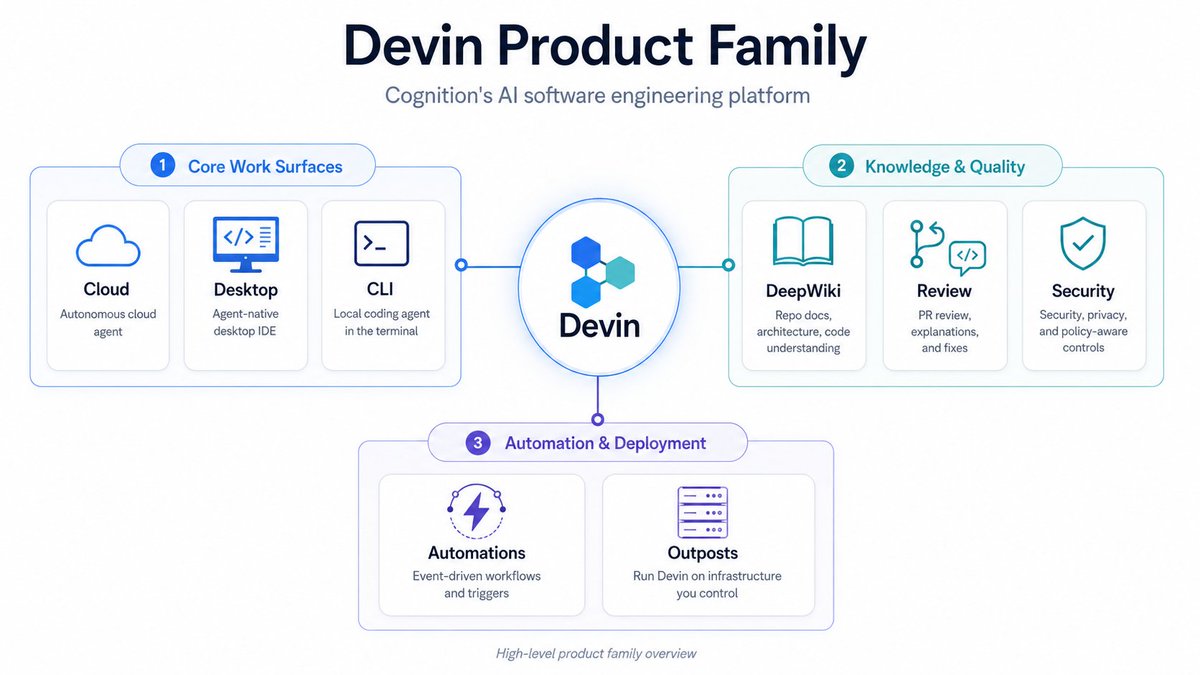
Here is the product family before we go further. Key things to get from this:
- Devin Desktop - is the local GUI/IDE that you install, like the codex app. You can use this for local agents but also for the cloud agents with the Agent view giving you an overview of all the sessions
- Devin.ai / Devin Cloud - this is where the cloud agents and features associated live. It's a PWA which works perfectly on mobile so you can run devins on your iphone anytime with no extra setup.
- Devin CLI - if you are not a fan of the GUI, you can install Devin CLI and work there just like you do in other CLIs such as Grok Build.
| Tool | What it does | Where it runs |
|---|---|---|
| Devin Cloud | Autonomous coding agent sessions | Isolated VMs in the cloud (Linux default, Windows available; Android emulator on the Linux desktop) |
| Devin Desktop | Next-gen IDE + agent command center | Your machine (macOS, Windows, Linux) |
| Devin CLI | Local terminal agent, with hooks | Your machine |
| DeepWiki | AI wiki + Q&A for every repo | Devin web, Desktop, deepwiki.com, MCP |
| Automations | Event- and schedule-driven sessions | Part of Devin cloud (Slack, GitHub, Linear, GitLab, web hooks, cron) |
| Devin Review | PR review platform | Part of Devin Cloud web app, GitHub/GitLab |
| Security Swarm | Vulnerability scanning + remediation | Devin cloud sessions |
| Outposts | Run sessions on your own infrastructure | Part of Devin Cloud - Your VMs / containers / Kubernetes / a Mac Mini / partner clouds |
Devin.ai / Devin Cloud Agents
The core of Devin is the cloud agent. A session on its own VM, with its own shell, browser, and repo access.[4]
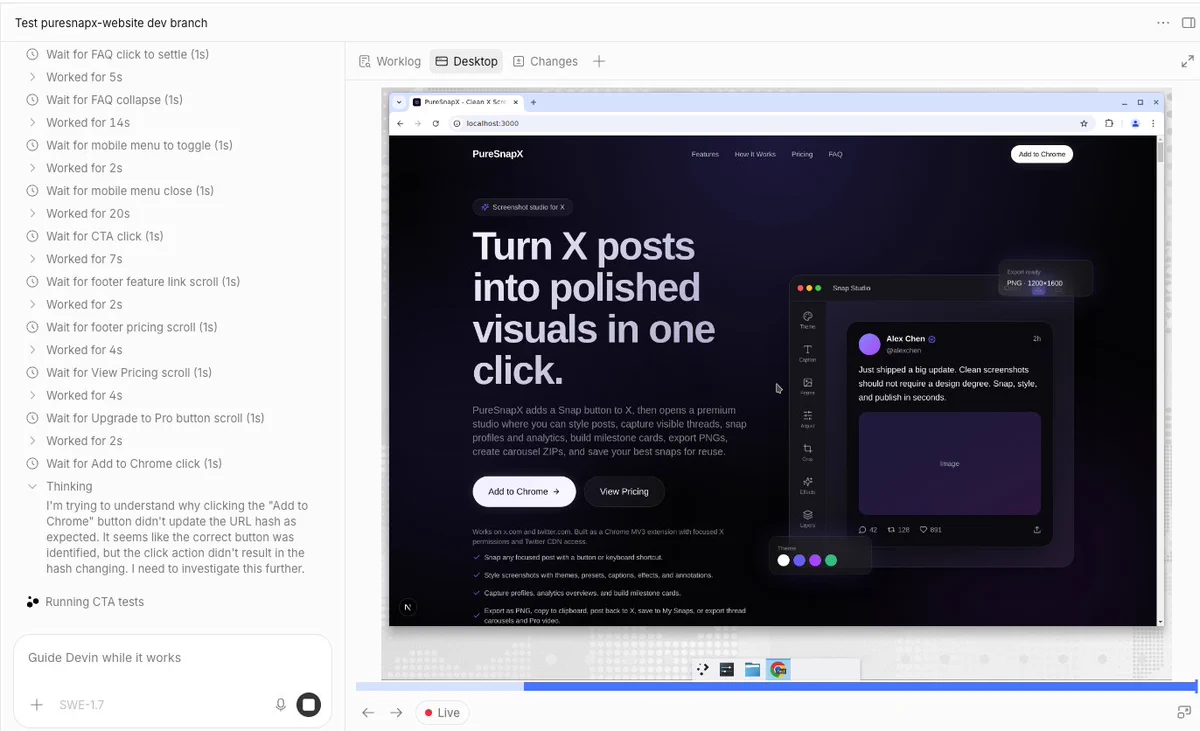
In my example testing task, Devin cloned my dev branch onto a cloud Ubuntu machine and started testing. At one point he opened developer tools and checked the menu in a mobile view. I sat there reading the findings while he kept going.
Cognition's engineering write-up is the reason I trust that setup more than a container on my laptop:[5]
Battle tested cloud agents on the go and this becomes my travel way of working more often.
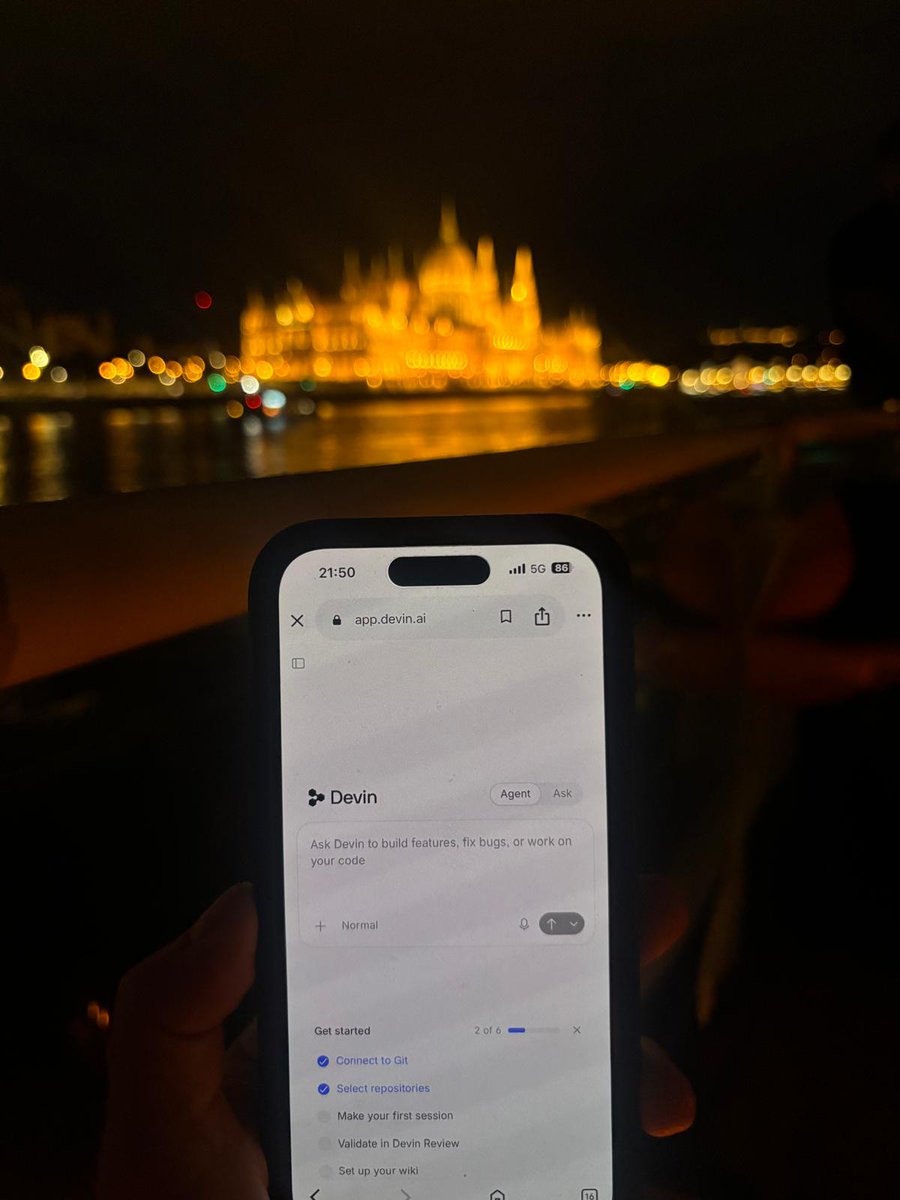
I want to use cloud coding more while I am away. It works out of the box with Devin. No Hetzner VPS. No install party. No extra setup. I just need the code pushed from my local repo to GitHub so that when the laptop is not around, Devin has the up to date code.
The way to go is VM-level isolation, not containers. Devin sessions run on dedicated VMs with isolated storage, networking, and compute. One compromised session cannot reach another's filesystem or credentials.[5]
Devin snapshots full machine state (memory, process trees, filesystem) so a session can pause compute and resume exactly where it left off.[5]
What that means in practice, according to them: you can run 10-20 Devins in parallel, each with its own dev server and environment. A single laptop cannot do that. I have not personally run 10-20 at once. I have run cloud sessions next to Desktop work, and even one extra machine I am not babysitting is already a different day.[6]
Pre-built snapshot environments
The workspace Devin operates in is a virtual machine with your repos cloned, tools installed, dependencies resolved, environment variables set, and configuration applied. That configuration is saved as a snapshot: a frozen, bootable image. Every session boots a fresh copy. Session changes do not persist back to it.[34]
The docs call environment configuration "the single highest-leverage thing you can do to improve Devin's effectiveness on your codebase."[34] You can ask Devin to set it up ("Set up your environment for this repo"), review the proposed blueprint, and let a build produce the snapshot. Each organization has exactly one active snapshot. Every session in that org boots from it.[34]
In a product demo, Nader Dabit (@dabit3, Growth at Cognition) wrote that every Devin Cloud Agent "gets a brand-new computer from a pre-built snapshot in as little as 3 seconds" and listed environments you can spin up or connect to: Linux, Windows, Android, macOS via Namespace, plus Cloudflare, Vercel, Modal, Daytona, NVIDIA Brev, NVIDIA OpenShell, and E2B.[51]
Every Devin Cloud Agent gets a brand-new computer from a pre-built snapshot in as little as 3 seconds. Your repos, tools, and dependencies are already there, so setup time is effectively zero. I've been onboarding dozens of new startups @cognition and this has been one of the Sho…
Partner platforms in that list overlap with Outposts integrations (Namespace, Vercel Sandoxes, Modal, OpenShell, Brev, Daytona, E2B, Cloudflare).[9][48] [51]
If you are new: you do not set up a sandbox, a CI runner, or a spare dev machine for the session. You give Devin a task and it works in its own environment. That "zero setup" story applies to Devin's session, not to your own CI.
Isolation and snapshots are why long-running, browser-based, CI-dependent work can leave your laptop without melting the machine or the security review. Spend time on the blueprint. Later sessions inherit it.
Linux, Windows VMs
Linux is the default platform for Devin sessions.[7]
But Devin builds, runs, and tests natively in its own Windows VM, which opens autonomous work on Windows-native apps: .NET Framework to .NET Core migrations, Windows Forms/WPF, SQL Server and Windows Services, and computer-use testing of Windows desktop applications.[8]
Windows sessions use the same declarative blueprint configuration and Git Bash shell as Linux, so most commands transfer.[7]
Windows environments consume roughly 9% more usage than equivalent Linux sessions. Useful if you plan capacity.[7]
What's Devin Outpost?
This is the feature that made cloud testing work for me.
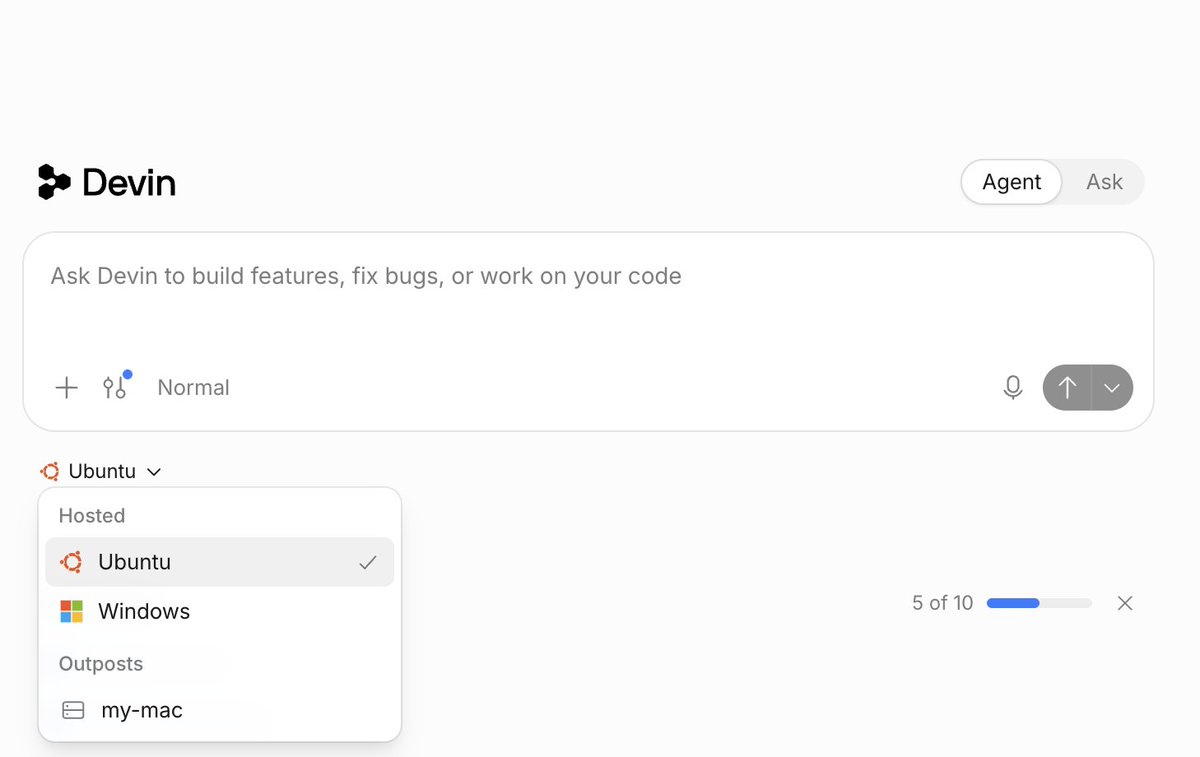
An outpost is a named queue of Devin sessions served on your own machines. Once you register one (say gpu-h200 or dev-boxes), it shows up as a machine option in Devin Cloud next to Ubuntu, Windows, and the rest. Cloud sessions started on an outpost wait in that queue until one of your machines picks them up.
Outposts lets Devin's agent loop (inference and planning) run in Devin's cloud while all execution (commands, file edits, repository access) happens on machines you operate. Your own VMs, containers, Kubernetes clusters, or a MacBook on your desk.[9]
A machine becomes a worker with:
devin worker start --outpost=<outpost_name>Workers only need outbound HTTPS. No inbound ports, public IPs, or VPN tunnels.[9]
N workers serve N concurrent sessions. Extra sessions wait in the queue.[9]
There is an open-source Kubernetes operator (devin-outpost-k8s) for the orchestration loop.[9]
Partner integrations: Namespace (Apple silicon / iOS), Modal, OpenShell (NVIDIA), Brev, Daytona, E2B, Cloudflare.[9][48]
When the docs say to use Outposts: sessions must run inside your network next to internal services, registries, and secrets. You need custom hardware (GPUs, big memory, specific OS images). Or you want enterprise control over network access and monitoring.[9]
macOS is an Outpost story, not a Devin Cloud VM. Computer Use works on Linux, Windows, and Outposts machines including macOS with a graphical desktop. macOS sessions do not run as first-party Devin Cloud VMs. They run on Outposts (your Mac, or a partner like Namespace).[37][48]
Namespace Devboxes can be Linux or macOS. macOS blueprints let you pick macOS and Xcode versions. Cognition's Outposts post describes first-class macOS on Namespace with computer use for building, running, and testing iOS apps.[48][49]
Trade-off, said plainly: Outposts shifts a lot of infrastructure work to you. Provisioning, isolation, access controls, capacity, monitoring, recovery. It is available on Pro, Max, and Teams accounts. On Dedicated Tenant it is off by default.[9]
Why outposts? Why not just Devin.ai directly?
In my case Devin needed to use X.
I tried Devin cloud agents without outposts, on a standard Ubuntu environment. Login to X was not working. Most likely X blocking robotic logins from datacenter IPs, plus whatever other safety nets they have.
With outposts, Devin uses my MacBook as the environment instead of that Windows or Ubuntu VM. It looks like I am using Chrome from my home network.
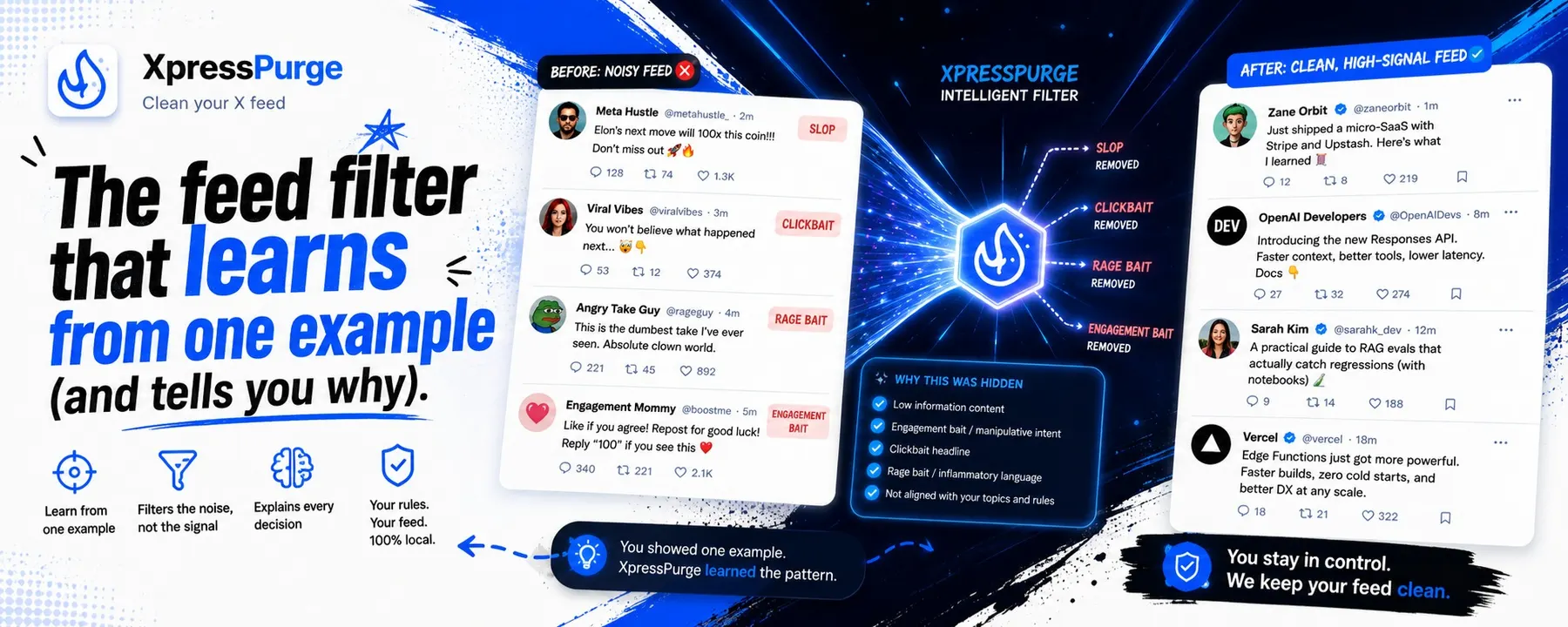
That is how I tested XpressPurge, my Chrome extension that filters X posts you do not want to see. Engagement bait, memes, or anything you specify.
I have been working on an AI filtering feature called AI Coach. Instead of adding keyword rules, you write what you like and dislike in your own words. AI then creates the settings. Selects packs, writes phrases, and an embedding model checks whether a post matches.
The test needed to cover end to end app functionality, plus AI Coach and automated filtering. That second part would normally mean me setting up Coach, scrolling an X account, and checking whether the filtered posts matched what I asked for or were wrong calls.
Was this fully automated 100% head to toes?
No.
And I did that on purpose. First time through. I asked Devin in the test plan to set everything up, up until the X login. Devin created 2 separate Chrome sessions, named each one with an HTML page (one Free, one Pro), and waited for me to log in. That part needed an SMS code. Rest was autopilot.
Devin ran an extensive test plan I already had in the repo. UI and UX first. Then onboarding as a new free user and a new pro user, with the likes and dislikes I had specified, checking that the right settings actually flipped on.
Then he went on X, scrolled, captured posts, and later captured what got filtered. I wanted a full report so I could see if the mechanics work as designed.
Each XpressPurge user can also hit a "wrong call" button on any post that should have stayed in the For You feed.
Devin scrolled for 15 minutes as a free user and 15 minutes as a pro user, saving the details on the side.
I got a full end to end report. I will go through it, then ask Kimi inside Devin Desktop to review the findings against the codebase and give me a list of fixes.
One more thing people miss: while a cloud agent is working, you can throw messages at him and he reacts. I thought he was stuck in settings. Asked why he was not scrolling X. He said that was expected, he was still on the settings phase of the plan, which I had forgotten. I also asked if RAM was fine.
When I needed to type a license key, I asked him to wait. He stopped. I took over the screen, then handed it back.
Mistakes I made, so you skip them:
Screen recordings. I asked for a recording, but I was in cmux and had not granted video and audio access. Fixing that meant restarting cmux, which would have killed the session. I skipped it. Have the environment ready before you start.
I could have split the test. App functionality that does not need X, on a normal cloud VM. X part in parallel on the outpost. That would have saved a lot of time.
Better prep on my side. I should have reviewed the test plan more carefully and had pro license codes ready so I did not interrupt him.
Devin Fusion mode
It runs a main agent with a frontier model plus a cheaper "sidekick" agent in parallel, and routes work dynamically mid-session.[10]
It is not just a model router.
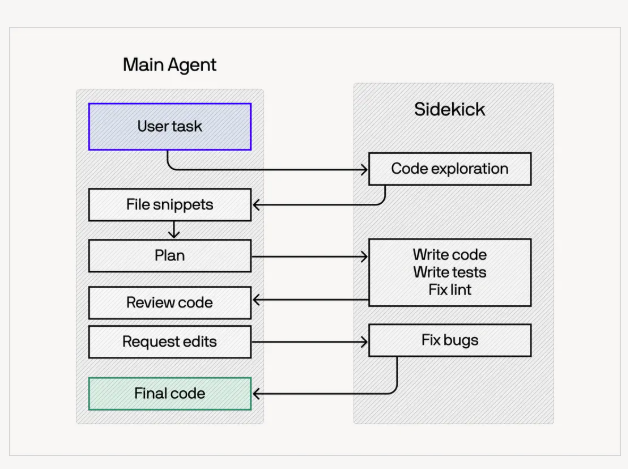
Sidekick approach: the main agent delegates mechanical work to the sidekick but keeps the bigger decisions. Plan, ambiguity, final review.[10]
Dynamic mid-session routing: lightweight classifiers switch models during context compaction, which makes model switches nearly free in cache terms.[10]
Here is an example how this would work in practice, all of that happens in the backend for you so you do not have to configure anything on your own.
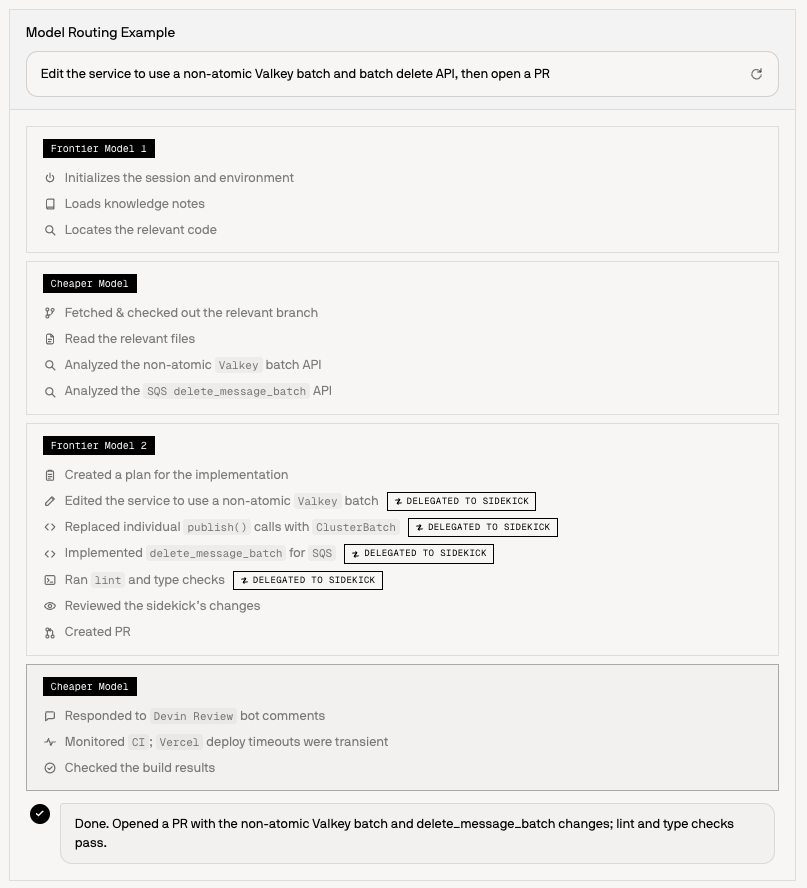
Results: 35% lower cost at publication on FrontierCode while maintaining frontier-level performance. On the latest FrontierCode 1.1 Extended data (updated 8/7/2026) Fusion is up to 60% cheaper.[10]
Internally, Cognition says 88% of their merged PRs were driven entirely by the automated Fusion router.[10]
Fusion is available as a preview in the Devin cloud agent.[10]
The subscription routes work so you are not forced to pay frontier prices for mechanical work.
DeepWiki: the wiki you can talk to
DeepWiki is Cognition's AI-generated wiki for a repository. Architecture diagrams, documentation, links to sources, summaries. The public site's tagline is "AI documentation you can talk to, for every repo."[28][31]
I have not made DeepWiki the center of my own workflow yet. I am writing this the way I explain it to people who ask.
What it is
Devin automatically indexes connected repos and produces a wiki you can open from the sidebar. Ask Devin uses that wiki, plus code search, to answer questions grounded in your code.[28]
For public GitHub repos, a free version lives at deepwiki.com. Submit any public repo URL, or replace github.com with deepwiki.com in a repo URL. Private repos need a Devin account.[28][32]
Cognition's launch post described DeepWiki as the free public version of Devin Wiki and Devin Search, and said tens of thousands of top public repos were already indexed. That figure is vendor-reported and time-sensitive.[32]
How it works
Wiki generation runs automatically when you connect repositories during onboarding.[28]
Effort is configurable per org (and overridable per repo): Low (default, free), Medium (~5-10 ACUs), High (~20-40 ACUs). Medium/high require an active subscription or credits. Enterprise orgs always run at low effort. The setting is not configurable for them.[28]
You can steer generation with .devin/wiki.json (repo_notes and optional explicit pages) so large repos do not skip the folders that matter. Limits: 30 pages (80 for enterprise), 100 notes, 10,000 characters per note.[28]
Ask Devin uses the wiki for context-grounded answers. The full Ask Devin experience (advanced search, planning, session creation) is in the Devin app. Public DeepWiki and DeepWiki MCP cover documentation and Q&A.[28]
DeepWiki MCP (https://mcp.deepwiki.com/) is free, remote, and requires no auth. Tools: read_wiki_structure, read_wiki_contents, ask_question. Prefer Streamable HTTP at /mcp. /sse is legacy.[29][33]
Why people use it
Get oriented on an unfamiliar codebase in minutes instead of reading everything.[28][32]
Answers come with source links, not a vibe summary.[28]
Free tier for public repos. Same idea for private repos inside Devin.[28][32]
It shows up where you already work: Devin web, Desktop hover, MCP, and any MCP client.[29][30]
If you are new: paste a public GitHub URL into deepwiki.com and ask how the app boots. Then do the same on your private repo after connecting it.
If you already onboard people on a big repo: write .devin/wiki.json so the wiki documents the modules you actually care about. Point other agents at mcp.deepwiki.com/mcp.
A live example
The best live example I can point you to is the wiki for the open sourced X algorithm: https://deepwiki.com/xai-org/x-algorithm
The X algorithm is now available on DeepWiki A simple way to start diving in and understanding how it works, complete with interactive Q&A deepwiki.com/xai-org/x-algo……
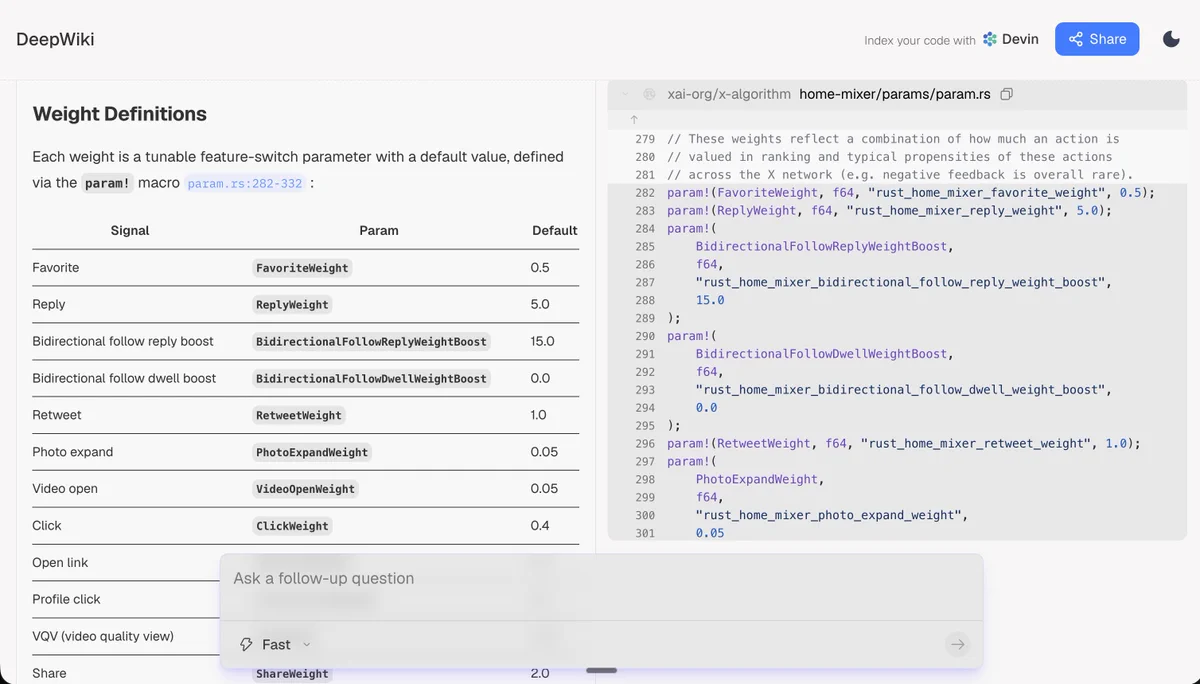
That repo is the code behind the For You feed. xAI open sourced it, and DeepWiki turned it into 14 pages: overview, architecture, the candidate pipeline, the Phoenix ranking system, the safety and abuse systems, even a glossary. Every page links back to the actual source files on GitHub, and there is an Ask box at the bottom where you can ask the wiki how a component works.
Two details that sold me on the format:
- Last indexed 13 August 2026, so the wiki tracks the repo as it changes instead of rotting like most docs.
- The overview page explains the pipeline in plain words: candidates come from Thunder for accounts you follow and Phoenix plus SimClusters for the rest of the network, then everything gets ranked by a Grok based transformer model. [58]
If you have ever stared at an unfamiliar repo and wished someone had written the map first, open that wiki and click around. Then paste any public repo URL into deepwiki.com and you get the same thing for your codebase.
Devin Review
Devin Review is a full-service PR review platform inside the Devin web app.[11]
I treat review as part of the same loop as testing. A PR is not done because an agent opened it.
Smart diff organization. Groups related changes logically instead of alphabetically. Detects copy and move instead of showing delete+insert.[11]
Bug catcher. Flags bugs with confidence labels. Severe bugs are highlighted.[11]
Security scanning. Detects vulnerabilities with CWE classification and severity levels.[11]
Codebase-aware chat. Ask questions about the PR and get answers grounded in the rest of the codebase. You can request code edits from chat and apply them as commits to the branch.[11]
Workflow actions. Merge, close, convert to draft, mark ready, toggle auto-merge directly from the review page. Requires the GitHub App connection for write actions.[11]
Stacked PRs are first-class. The review shows the whole stack, diffs each PR against the layer below, and handles atomic stack merges.[11]
Auto-review. Devin can automatically review PRs on open, on new commits, or when a draft is marked ready. Trigger modes are configurable per repo and per user.[11]
GitHub and GitLab are supported, including Enterprise / Self-Managed variants.[11]
If you already run a review culture: this is a review surface that organizes, explains, flags, and (when you enable it) fixes findings, synced back to GitHub/GitLab. It is more than an AI glancing at a diff.
The part that actually sold me: live testing
After Devin creates a PR, it can enter a structured testing mode that runs the app end to end and sends you video recordings as proof.[12]
This is the feature that made me a cloud-agent user. I had my website tested by a Devin cloud agent, end to end, with a full test report. That is what encouraged me to do the XpressPurge run on an outpost.
The workflow is three phases:[12]
- Setup. Installs dependencies, starts services, logs into required accounts, requests missing secrets.
- Test planning. Writes a short, concrete, source-grounded test plan. The single most important end-to-end flow that proves the feature works.
- Recording and execution. Records the screen, interacts with the app through the browser, annotates key moments, auto-zooms on clicks, compresses idle time, and attaches the video to the session.
Cognition's engineering post adds color I wish I had known earlier:[6]
Devin can also produce a test report with labeled screenshots and a video with chapters and pass/fail assertions in a chronological list.
Devin extracts repeated setup steps (like logins) into deterministic scripts saved as skills, so future tests start authenticated in seconds.
Billing note: test mode was billed at 1/5th the normal usage cost to encourage experimentation. Verify current pricing on your plan.
Honest limits: computer use still has hard edges. Timing-sensitive UI like toasts can be missed. Models may sometimes cheat by driving state via JS instead of clicking like a user. Treat a video as evidence to review, not a substitute for your test suite.
My own first pass was assisted on purpose. Some bits I decided not to automate because they were early and I did not want to spend the prep time. That is fine. You can still get a real report.
Side Chats
Released 2026-08-12. Start a side conversation anchored to any point in a session. Hover menu on a message, add-tab menu, or /btw your question. It opens in a panel next to the worklog with session context up to that point.[43][44][53]
New Devin Cloud Agent QOL improvement: Side Chats Start a side conversation anchored to any point in a session to ask questions and dig into details without interrupting Devin’s main work. Side chats open in a panel next to the worklog. You can also open a Side Chat with /btw
Side chats are read-only. Devin can search and read the codebase but cannot edit files, run commands, or change the session's work. You can stop a response mid-answer. The main session keeps running.[43]
That is the "Devin is your buddy you can talk to while he works" thing, without derailing the job.
Computer Use is the underlying capability
Devin has a full desktop. Mouse, keyboard, screenshots. A browser is only part of it. It can operate web apps, desktop apps, TUIs, and anything that renders on a 1024x768 display. Computer Use works on Linux and Windows sessions, and on Outposts machines including macOS with a graphical desktop. It is not available as a first-party macOS Devin Cloud VM.[37]
Enable it with Settings > Customization > Enable desktop mode (org admin; available on all plans).[37]
That is what I used on my MacBook via an outpost. Same idea as the Ubuntu cloud session, except the machine was mine, so Chrome and X looked like me.
Demos you should see
These are product demos on real Mac environments (Namespace or your own hardware via Outposts). I did not run these.
macOS release, end-to-end (demo, 2026-08-05). Devin built a native SwiftUI app, code-signed it, notarized with Apple via notarytool, stapled the ticket, packaged a signed DMG with a drag-to-Applications window, then used computer use to mount, drag, eject, and launch with zero Gatekeeper warnings. It verified notifications by checking the macOS notification database on screen and delivered a recording plus a release report.
Devin Cloud Agents can now build and ship a real macOS release end-to-end, all in a real Mac environment (with full computer use). In this demo, the agent builds a native SwiftUI app, code-signs it, notarizes with Apple via notarytool, staples the ticket, and packages a signed Sh…
Multiplayer iOS game (demo, 2026-08-14). Devin connected to a Mac in the cloud, built the game in Xcode, launched 3 iPhone simulators, connected the clients over websockets, and played them against each other with computer use. Verification used both vision (simulator screenshots) and non-vision signals (relay logs: joins/messages per player).[54] The public multiplayer PR is github.com/dabit3/jumpy-otter/pull/3. A local WebSocket relay, Swift client, and integration tests, merged 2026-08-15, with a linked Devin session.[50]
New experiment: can my cloud agent build and test multiplayer iOS games? Devin connects to a Mac in the cloud, boots and builds the game in Xcode, launches 3 iPhone simulators, connects all 3 clients via websockets, and plays them against each other using computer use. For Show m…
If you are new: this is the part I would show a friend. You see the app actually being exercised, instead of only a green checkmark.
If you already have suites: combine this with them. Use recordings to review agent work without pulling branches. For iOS/macOS, budget Outposts or Namespace capacity and treat demo timings as demos.
Sleep safe with Security Swarm
Security Swarm is Devin's security scanning and remediation product.[13]
I have not run a Security Swarm pass on my own repos yet. I am documenting what the product does, because people ask if Devin "does security" and the honest answer is: there is a dedicated loop, and a finding is still a lead.
Threat-model-driven. Devin builds a threat model tailored to your code (attacker, sensitive assets, trust boundaries, entry points) before investigating. Interactive mode lets you approve it first.[13]
Agentic MapReduce. The repository is divided among parallel Devins for broad coverage and deep investigation while bounding cost.[13]
Findings with evidence. Severity, exploitability, confidence, affected files, code snippets, remediation recommendations, sandbox validation results, and associated PRs.[13]
Sandbox validation. When configured, Devin builds and exercises the app in a non-production environment to prove exploitability. The docs are explicit that a failed validation does not always disprove a finding.[13]
Remediation. Assign a finding to Devin and it opens a remediation PR. Auto Scan can incrementally re-scan new commits on a schedule.[13]
Scope: RCE, SQL injection, path traversal, SSRF, authorization bypasses, memory-safety bugs, DoS, chained exploits across files. Benchmarked against the GitHub Advisory Database.[13]
Cognition also runs a Security Vulnerability Remediation Program to clear vulnerability backlogs and set up continuous remediation, and it evaluates its own models' trustworthiness.[14][15]
The professional rule, and the docs say this too: a finding is a lead, not proof. Check the reachable path, controls, and concrete impact before acting.[13]
Not only coding: Automations, scheduled sessions, and the ops loop
Automations wire external events to Devin sessions that start on their own. Instead of tagging Devin every time a bug lands or CI fails, you define the trigger once.[38]
I have not built a big automations mesh yet. Testing became my go-to cloud task. The reason I care about this section is travel. It is summer. I travel with my family. Not being glued to the laptop would help me balance that time. Automations and cloud sessions are how that becomes real, once the repo on GitHub is up to date.
An automation has three parts:[38]
Trigger. Slack message or reaction. GitHub issue / PR / CI / push. Linear issue events. GitLab issues / notes / pushes / pipelines (added 2026-08-07). A schedule. Or a custom webhook (PagerDuty, Datadog, Sentry, anything that can POST).[38][44]
Conditions. Optional filters (label is bug, conclusion is failure, "not contains", and so on).[38][44]
Action. Start a session, message an existing session, run as a triage monitor, or send an email.[38]
Docs now recommend Automations with a Schedule trigger for new scheduled work. The older Scheduled Sessions product still works (recurring or one-time; from the input box or Settings > Schedules).[39]
Recent automation surface (release notes, 2026-08-07, check your plan): queueing and concurrency groups; automations API promoted to production v3 plus a Terraform devin_automation resource; GitLab triggers; run-once schedules; Security Profiles GA; personal automations; Auto-Triage.[44]
Auto-Triage
Auto-Triage is a persistent Devin that monitors a Slack channel, filters noise, deduplicates, and spawns child sessions to investigate. It keeps a shared scratchpad (routing table, recent items, duplicates). Cognition's blog says it can inspect the codebase, check observability tools, ask for missing context, tag an owner, or open a PR. It is built for untrusted inputs (Slack, tickets, webhooks) and runs in network-sandboxed environments with extra prompt-injection protections.[40][47]
I have not stood one of these up. If I did, I would start on a dedicated #bugs channel with a hard ACU cap.
Scheduled and managed Devins
Cognition also shipped Scheduled Devins (describe a recurring job; Devin sets the cadence and keeps notes across runs) and Managed Devins (a coordinator Devin breaks work into child sessions, each on its own VM). They compose: a weekly QA pass can spawn one child per page, then compile a Slack report.[45][46]
Managed Devins are described as available for all users in the launch post. Confirm in-product.[46]
Agent-driven operations (use cases, not a replacement for SREs)
Agent-Driven Operations for Reliable Infrastructure SREs own uptime, incident response, and the infrastructure that makes reliability an engineering problem. Designing systems that prevent the next incident is the most valuable part of this job, but...
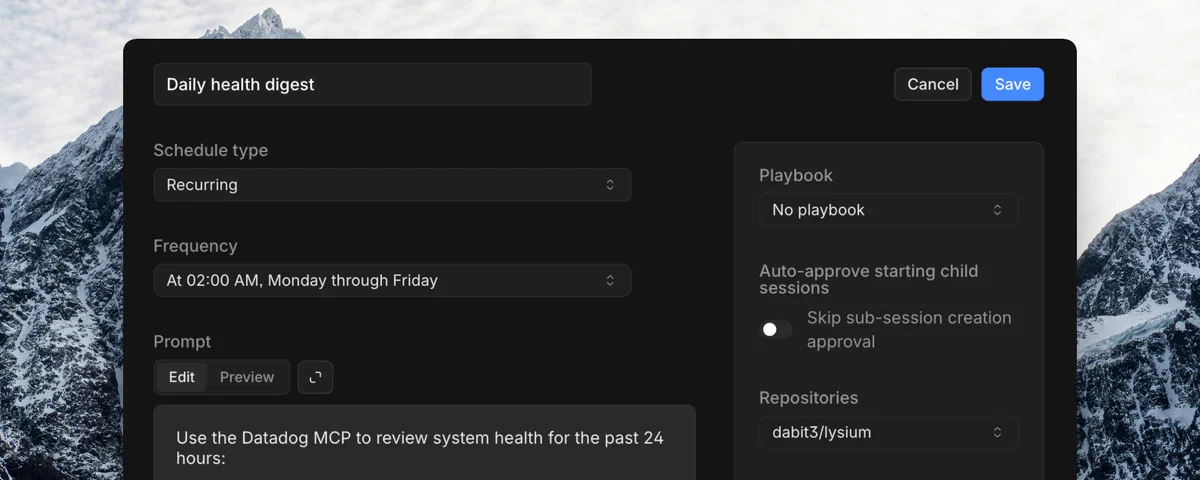
Official automations templates cover the same shape: CI failure fixer, nightly smoke tests, weekly dependency updates, daily health digest, Datadog/Sentry investigation, stale-PR cleanup, secret scanning.[38][57]
Example loop from that post:[57]
- Error tracker alert → investigate stack trace → PR + regression test
- Morning health digest to Slack
- Nightly E2E smoke tests
- Weekly dependency updates with grouped PRs
- Post-launch feature-flag removal
- On-call alert → logs/metrics → root-cause note
- Log-scan → tickets
- Post-deploy config-drift audit
- Runbook execution for a known incident type
- Postmortem draft after an incident resolves
The line I would keep from that post:
"None of this replaces SREs. It gets the toil out of the way" so people spend time on capacity planning, SLO design, and the work that actually prevents outages.[57]
If you are new: start with one template (CI failure fixer or Slack bug triage). Set an ACU cap and an invocation limit before you turn it on.[38]
If you already run on-call: treat automations that read Slack or public GitHub as untrusted-input systems. Use network policies, Security Profiles, and narrow conditions. Public-repo GitHub triggers are opt-in for a reason.[38][44]
Hooks: when a prompt is not enough
Prompts steer the model. Hooks run your code at known lifecycle points, whether or not the model remembers the rule.[41][56]
I have not written a big hooks file yet. The idea clicked for me the same way test plans did. If something must always happen, do not leave it in a paragraph of instructions.
Official Devin CLI docs: place JSON in .devin/hooks.v1.json (or a user-level config). Devin CLI also picks up .claude/ hooks automatically. Hooks can enforce policies, add context, run side effects, or modify permissions.[41]
Lifecycle events in the docs: PreToolUse, PostToolUse, PermissionRequest, UserPromptSubmit, Stop, PostCompaction, SessionStart, SessionEnd.[41]
A minimal policy hook:
{
  "PreToolUse": [
    {
      "matcher": "exec",
      "hooks": [
        {
          "type": "command",
          "command": "./scripts/check-command.sh"
        }
      ]
    }
  ]
}
The script receives JSON on stdin. Exit 2 (or return "decision": "block") denies the action. You can also inject additionalContext or rewrite tool input with updatedInput.[41]
@dabit3's May 2026 hooks essay is the clearest product framing, and it matches the docs:[56]
"Use prompts for guidance. Use hooks for behavior that should run every time."
A project instruction can say "do not edit generated files." A PreToolUse hook can block the edit before it happens.
A project instruction can say "run tests before finishing." A PostToolUse hook can run the suite and a Stop hook can prevent completion when the last run failed.
Rule of thumb: when a requirement says always / never / block / record / run / verify, it probably belongs in a hook.
Companion demo: agent-hooks-demo (Devin for Terminal, Claude Code, Codex, Cursor). Verify the repo is still public before linking in a published post.
Hooks do not make the whole agent deterministic. The model can still choose a different plan. What becomes deterministic is narrower and useful: when the event fires, your handler runs.[56]
If you are new: add one hook that blocks edits to generated/, .env, and .git. That is enough to feel the difference.
If you already write agent instructions: keep prompts for style and architecture. Put protected paths, command denylists, test gates, and audit logs in hooks. Use /hooks to see what is actually loaded.[41]
Why I spend most of my time in Devin Desktop
Devin Desktop is the next generation of Windsurf. Built for a world where more of the job is managing agents, not only typing in a file.[3][16]
You have the view you know from windsurf or cursor with the agent sidebar but also the agent view where I spend the most time nowadays
The Agent Command Center is the default surface for me. A Kanban board grouped by status showing every agent you have running, local and cloud, with what is in flight, blocked, and ready for review.[3][17]
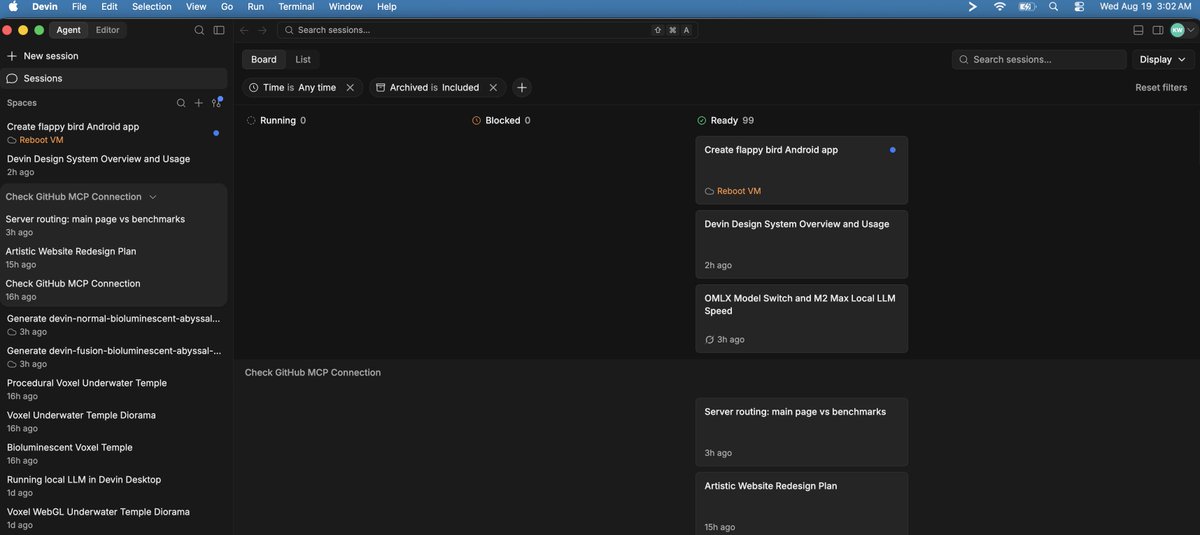
Spaces group related agent sessions, PRs, files, and context for a task or project, so agents share context and collaborate.[3][17]
A full IDE. Editor, terminal, LSPs, extensions, keybindings. Fully backwards-compatible with Windsurf for last-mile human edits.[3]
Devin Desktop supports the Agent Client Protocol (ACP), so any ACP-compatible agent can run inside it alongside Devin.[3]
Installs on macOS, Windows, and Linux. Imports VS Code or Cursor settings.[18]
Local agent features: Devin Local (the next-gen harness shared with the CLI), MCP servers, memories and rules, context awareness, workflows, one-click app deploys, and Quick Review (an agentic second opinion on local changes; SWE-check is free, GPT/Opus review models are token-priced).[18][19]
From Devin desktop you can kick off devin cloud sessions and work locally with the models you love. That's the way how I work with this. You can always work with cloud agents within devin.ai platform but the Agent View in Desktop is convenient to keep both your local and cloud sessions.
Models: SWE-1.7, Lightning, Adaptive, and a lot more
Devin's subscription has all the models you know, love and need: OpenAI old and new models, Anthropic, Deepseek flash and pro, Kimi, GLM, their own SWE models, Genini models, even Nemotron or Inkling.
You can use Adaptive, which is a cost efficient model router which chooses the right model for each task or select a model from the wide list.
SWE-1.7. Cognition's most capable in-house model, launched July 2026, trained from a Kimi K2.7 base with frontier-level intelligence at much lower cost. 42.3% on FrontierCode 1.1 Main at launch.[20]
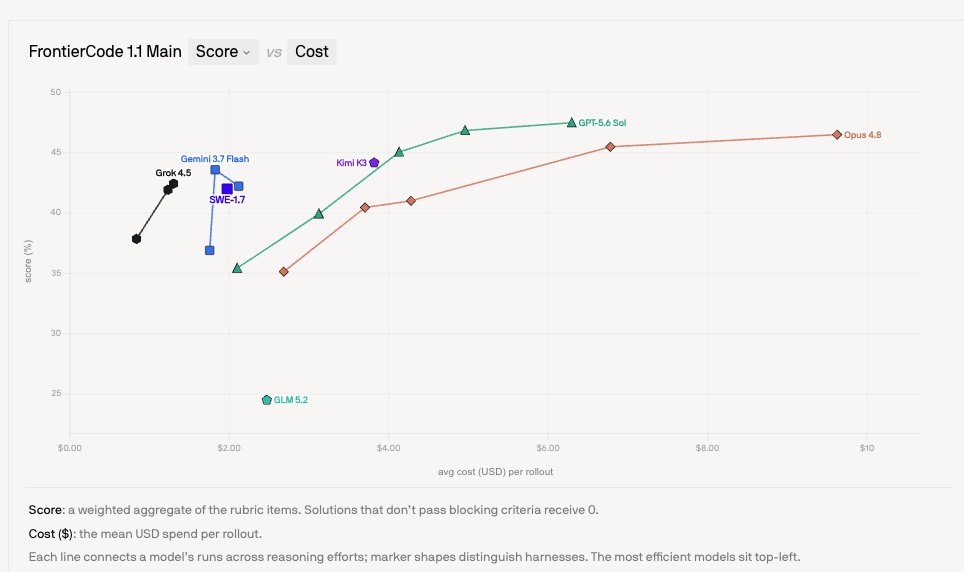
SWE-1.7 Lightning. A faster version served on Cerebras, "delivering the same intelligence with lower latency." SWE-1.7 is available in Devin Web, Desktop, and CLI via Cerebras at 1000 tokens/second.[20][21]
Other in-house models: SWE-1.6, SWE-1.6 Fast, SWE-1-mini (powers Tab suggestions), swe-grep (context retrieval), swe-check (Quick Review).[21]
For my work I use SWE 1.7 or deepseek flash 0731 or Luna if I need a worker, Kimi K3 for complex tasks (or sometimes do all with Kimi as it's very swift and reliable).
Start in the terminal, hand off to the cloud
Devin CLI is a local coding agent that runs directly in your terminal with full access to your codebase and tools.[23]
The signature move is /handoff:[4][23][24]
/handoff fix the flaky integration tests in CI
The CLI packages the conversation context, current git branch, and uncommitted changes, then creates a cloud session with its own VM, shell, browser, and repository access. The work continues after you close your laptop.[4][23][24]
Run /handoff with no description and the cloud session continues from where you left off.[24]
Hand off from any agent. An open-source Devin Handoff plugin brings the same workflow to Claude Code, Codex, Cursor, and plain shell scripts (needs a Devin API key as DEVIN_API_KEY).[24]
When to hand off: dev servers, browser work (OAuth flows, E2E, screenshots), CI/CD debugging, long-running migrations and refactors, parallel execution.[24]
Hooks (see the hooks section) are a CLI extensibility surface: .devin/hooks.v1.json, plus inherited .claude/ hooks.[41]
Security note: because uncommitted changes carry over, commit or stash anything you do not want sent to the cloud session.[24]
If you are just starting
- Create a Devin account and connect a repository. Open DeepWiki in the sidebar (or deepwiki.com for a public repo) and ask how the app is structured.[28]
- Start a cloud session (or install Devin Desktop / CLI. All are free to try with an account). If you will test UI, enable desktop mode.
- Give a scoped task with acceptance criteria. Something like: "Add a team selector to the search bar, gated on a flag, with tests."
- Let Devin work in its own VM (booted from your snapshot). Use a Side Chat (/btw) if you have a question that should not interrupt the main run.[43]
- When it opens a PR, use Devin Review, then click "Test the app" and watch the recording.
- Merge only when the evidence (review, tests, video) is good enough for you.
The same loop works in Devin Desktop (Kanban board view) or Devin CLI (/handoff). After one good session, turn that loop into an automation if it should happen every time a ticket or CI failure arrives.[38]
If you want a first real win, start where I started. Pick the clicking you already do after a release. Ask Devin to write a test plan from the code, then run it in the cloud.
If you already live in this stuff
Parallel agents. Run 10-20 sessions in parallel, each with its own dev server. The cloud model makes this practical.[6] Use Managed Devins when one coordinator should split the work.[46]
Blueprints and environments. Declarative YAML blueprints produce snapshot builds per platform. Write multi-platform blueprints with runs-on: default and runs-on: windows. Add an Android AVD when you ship mobile.[7][34][35]
Outposts. Put sessions next to internal services, secrets, and registries. Use Namespace or a local Mac for Xcode/iOS. Scale with more workers. Orchestrate with Kubernetes.[9][48][49]
Automations. Start from templates. Set ACU and invocation limits. Use Auto-Triage on a dedicated #bugs channel. Prefer Schedule triggers over the legacy scheduler for new work.[38][39][40]
Hooks. One PreToolUse denylist plus one Stop-on-failed-tests gate will beat another paragraph of project instructions.[41][56]
Governance. Enterprise controls include SSO, RBAC, custom roles, IP access lists, SCIM, customer-managed keys, and FedRAMP High In-Process status. Cognition is SOC 2 Type II and ISO 27001 compliant, and no customer code is used for training.[8][25]
Review at scale. Enable auto-review, use stacked-PR views, cap per-PR review spend, and use the consumption dashboard to track ACU usage.[11]
Fusion routing. Let the router pick models. Keep frontier models for judgment-heavy decisions and sidekicks for mechanical work.[10]
Enterprise proof points: Itaú, one of Latin America's largest banks, reportedly completed migrations 5-6x faster, auto-remediated 70% of static-analysis security vulnerabilities, and doubled test coverage with ~17,000 engineers. Mercedes-Benz is deploying Devin and Windsurf across its global engineering org.[5][26]
What I want you to know, and what I want to hear
I will be using Devin's cloud features more. Testing became my go-to task on Devin.ai. I also want the rest of the loop to hold up when I am not at the desk.
My main driver to go to cloud was testing on a cloud vm and full testing reports afterwards, but I am more convinced to just handover all to Devin Cloud and not being bothered by model choices managing my mac resource usage.
The useful picture is not "one magic model." It is: delegate, execute in a real environment, test, review, then ship. Laptop closed if you want it closed. Evidence instead of a shrug.
What do you want to know more about?
Devin Desktop and the features I actually like?
How to use other subscriptions inside Devin?
Let me know what would be useful.
Happy to assist 🫶😎
Sources
[1] https://docs.devin.ai/get-started/devin-intro
[2] https://cognition.com/blog/what-we-learned-building-cloud-agents
[3] https://cognition.com/blog/introducing-devin-desktop
[4] https://docs.devin.ai/cli/handoff
[5] https://cognition.com/blog/what-we-learned-building-cloud-agents
[6] https://cognition.com/blog/testing-development
[7] https://docs.devin.ai/onboard-devin/environment/windows-support
[8] https://cognition.com/blog/devin-is-getting-a-windows-pc
[9] https://docs.devin.ai/cloud/outposts/overview
[10] https://cognition.com/blog/devin-fusion
[11] https://docs.devin.ai/work-with-devin/devin-review
[12] https://docs.devin.ai/work-with-devin/testing-and-recordings
[13] https://docs.devin.ai/work-with-devin/security-swarm
[14] https://cognition.com/blog/devin-security-vulnerability-remediation-program
[15] https://cognition.com/blog/measuring-open-source-model-trustworthiness
[16] https://docs.devin.ai/desktop/getting-started
[17] https://docs.devin.ai/desktop/agent-command-center
[18] https://docs.devin.ai/desktop/getting-started
[19] https://docs.devin.ai/desktop/quick-review
[20] https://cognition.com/blog/swe-1-7
[21] https://docs.devin.ai/desktop/models
[22] https://docs.devin.ai/cli/models
[23] https://cognition.com/blog/devin-for-terminal
[24] https://docs.devin.ai/work-with-devin/devin-handoff
[25] https://cognition.com/blog/devin-fedramp-high-in-process
[26] https://cognition.com/blog/mercedes-benz-cognition
[27] https://cognition.com/blog/ai-guarantee
[28] https://docs.devin.ai/work-with-devin/deepwiki
[29] https://docs.devin.ai/work-with-devin/deepwiki-mcp
[30] https://docs.devin.ai/desktop/deepwiki
[31] https://deepwiki.com
[32] https://cognition.com/blog/deepwiki
[33] https://cognition.com/blog/deepwiki-mcp-server
[34] https://docs.devin.ai/onboard-devin/environment
[35] https://docs.devin.ai/onboard-devin/environment/android-emulation
[36] https://cognition.com/blog/android-emulator
[37] https://docs.devin.ai/work-with-devin/computer-use
[38] https://docs.devin.ai/product-guides/automations
[39] https://docs.devin.ai/product-guides/scheduled-sessions
[40] https://docs.devin.ai/product-guides/auto-triage
[41] https://docs.devin.ai/cli/extensibility/hooks/overview
[42] https://docs.devin.ai/enterprise/features/devin-coach
[43] https://docs.devin.ai/work-with-devin/devin-session-tools
[44] https://docs.devin.ai/release-notes/overview
[45] https://cognition.com/blog/devin-can-now-schedule-devins
[46] https://cognition.com/blog/devin-can-now-manage-devins
[47] https://cognition.com/blog/auto-triage
[48] https://devin.ai/blog/introducing-devin-outposts
[49] https://namespace.so/docs/devbox/devin
[50] https://github.com/dabit3/jumpy-otter/pull/3
[51] https://x.com/dabit3/status/2087005722336760108
[52] https://x.com/dabit3/status/2086908290689069461
[53] https://x.com/dabit3/status/2088412013076578410
[54] https://x.com/dabit3/status/2088409355586584646
[55] https://x.com/dabit3/status/2085089240153804937
[56] https://x.com/dabit3/status/2055319214202777894
[57] https://x.com/dabit3/status/2042305301802860855
[58] https://deepwiki.com/xai-org/x-algorithm